

Note:
- The circuit breaker functionality is available only for licensed users with Circuit Breaking capability.
- This feature is disabled by default. To enable it, use the environment variable
CONVOY_ENABLE_FEATURE_FLAG=circuit-breakeror the CLI flag--enable-feature-flag=circuit-breaker.- Requires Redis for state storage and a running agent (or equivalent process) that executes deliveries so circuit state is applied during dispatch.
Overview
The circuit breaker implements a three-state pattern to intelligently manage endpoint health:- Closed (Normal): All requests flow through normally
- Open (Tripped): Requests are blocked to prevent further failures
- Half-Open (Recovery): Limited requests allowed to test if the endpoint has recovered
How It Works
State Transitions
-
Closed → Open (Tripping)
- Triggers when the failure rate exceeds the configured threshold
- Requires a minimum request count to be met
- Example: With a 70% threshold and 10 minimum requests, 7 out of 10 failures will trip the breaker
-
Open → Half-Open (Recovery Mode)
- Automatically transitions after the configured timeout period
- Allows limited requests to test endpoint health
-
Half-Open → Closed (Reset)
- Occurs when the success rate meets the threshold
- Endpoint returns to normal operation
-
Consecutive Failures (Disable)
- After repeated circuit breaker trips, the endpoint is automatically disabled
- Notifications are sent to endpoint contacts and project owners
Monitoring Window
The circuit breaker continuously monitors endpoint health by:- Sampling delivery attempts at regular intervals (default: every 30 seconds)
- Analyzing metrics from a rolling time window (default: last 5 minutes)
- Calculating failure and success rates from actual delivery attempts
observability_window setting directly impacts how quickly a circuit breaker can trip:
- Shorter window (e.g., 3 minutes): Faster response to failures, but more sensitive to temporary issues
- The breaker only needs enough failures within 3 minutes to meet the threshold
- Example: 10 failures in 3 minutes = faster trip
- Longer window (e.g., 10 minutes): Slower to trip, but more stable and less prone to false positives
- Requires sustained failures over a longer period
- Example: 10 failures must occur across 10 minutes = slower trip
-
Minimum requests must accumulate: The
minimum_request_countmust be reached within theobservability_windowfor evaluation- Example problem:
5 req/mintraffic withminimum_request_count = 10andobservability_window = 1 minutewill never trip because it can’t reach 10 requests - Example solution: Increase
observability_windowto 5 minutes to allow accumulation
- Example problem:
-
Sample rate vs observability window: The
sample_ratedetermines how often the circuit breaker checks, whileobservability_windowdetermines the data it analyzes- Checking every 30 seconds with a 5-minute window means each check analyzes the last 5 minutes of data
- A longer
sample_ratedelays detection but reduces system load - A shorter
sample_rateenables faster detection but increases processing frequency
Configuration
Circuit breaker settings can be configured per project. Each setting controls different aspects of the circuit breaker’s behavior.Configuration Options
Configuration Priority
Circuit breaker configuration is resolved in this order:- Project-level configuration - Custom settings for your project
- Application-level configuration - System-wide defaults
- Hardcoded defaults - Fallback values
Usage Examples
Example 1: Standard Configuration
For a typical webhook endpoint with moderate traffic:- Checks endpoint health every 30 seconds
- Trips the breaker if 70% of requests fail (minimum 10 requests)
- Requires 10% success rate to recover
- Disables endpoint after 10 consecutive circuit breaker trips
Example 2: Aggressive Protection
For critical systems requiring fast failure detection:- Checks more frequently (every 15 seconds)
- Lower failure tolerance (50%)
- Requires a higher success rate to recover (20%)
- Disables endpoint faster (after 5 trips)
Example 3: Lenient Configuration
For endpoints with acceptable occasional failures:- Checks less frequently (every 60 seconds)
- Higher failure tolerance (85%)
- Easier recovery (5% success)
- More lenient with repeated failures (15 trips before endpoints are disabled)
Updating Disabled Endpoints
Endpoints that are disabled (inactive) due to consecutive failures can be re-enabled on the dashboard.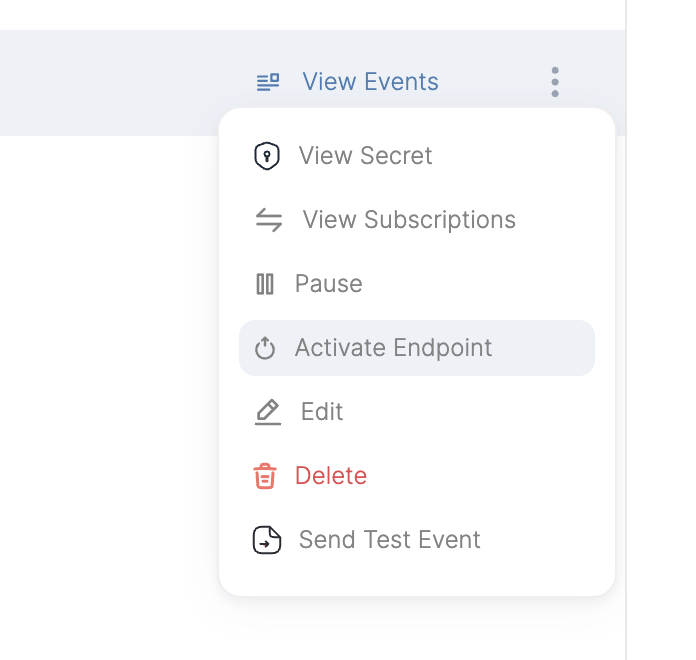
Managing Circuit Breakers
Viewing Circuit Breaker State
You can check the current state of a circuit breaker for any endpoint using the CLI:- Current state (Closed, Open, or Half-Open)
- Request counts and rates
- Consecutive failure count
- Next reset time (if applicable)
Updating Configuration
To update circuit breaker configuration for a specific project:Notifications
When circuit breaker thresholds are exceeded, Convoy automatically sends notifications to:- Endpoint support contacts
- Project owners
Best Practices
- Start with defaults: The default configuration works well for most use cases
- Monitor your metrics: Review delivery attempts before tuning thresholds
- Calculate your timing requirements: Consider how quickly you need to detect and respond to failures
- Example: If your endpoint receives 2 requests per minute and you want to detect failures within 10 minutes:
-
observability_window: 10 minutes (detection timeframe) -
minimum_request_count: 10-20 (achievable with 2 req/min × 10 min = 20 requests) - Expected trip time: 5-10 minutes after failures start
- Example: For high-traffic endpoints (100 requests per minute) requiring fast detection:
-
observability_window: 2 minutes (quick detection) -
minimum_request_count: 50 (easily met with 100 req/min × 2 min = 200 requests) - Expected trip time: 1-2 minutes after failures start
- Match window to traffic volume: Ensure
minimum_request_countcan be reached withinobservability_window
- Low traffic (< 5 req/min): Use longer windows (10+ minutes)
- Medium traffic (5-50 req/min): Use moderate windows (5-10 minutes)
- High traffic (> 50 req/min): Can use shorter windows (2-5 minutes)
-
Balance recovery time: Longer
error_timeoutgives endpoints more recovery time but delays legitimate traffic - Test your configuration: Use lower thresholds in staging to verify behavior and measure actual trip times
Troubleshooting
Circuit Breaker Not Triggering
- Verify
minimum_request_countis being met in theobservability_window - Check that failure rate actually exceeds
failure_threshold - Ensure the circuit breaker feature is enabled in your license
- Confirm the feature flag is enabled for your deployment
Endpoint Disabled Unexpectedly
- Review
consecutive_failure_threshold- may be too low for your use case - Check delivery attempt logs for underlying endpoint issues
- Verify endpoint is actually healthy and reachable
- Consider increasing
error_timeoutto allow more recovery time
Circuit Breaker Not Resetting
- Ensure endpoint is returning successful responses (2xx status codes)
- Verify
success_thresholdis achievable with current traffic - Check that requests are being allowed through in Half-Open state
- Review delivery attempt metrics during recovery period
Technical Details
Storage
Circuit breaker state is stored in Redis with automatic expiration matching the observability window. The state includes:- Current state (Closed/Open/Half-Open)
- Request counts and rates
- Consecutive failure counter
- Reset timestamps
- Notification history
Metrics Source
The circuit breaker analyzes actual delivery attempts from the database, querying:- Delivery success and failure counts from recent delivery attempts
- Grouped by endpoint and project
- Within the configured observability window
High Availability
Circuit breaker sampling uses distributed locking to ensure:- Only one convoy agent instance samples at a time across your deployment
- The Lock TTL matches the sample rate
- Automatically fails-open if a sampler crashes